 Rakshit Narula
Conversion Tracking Guide: How to Set It Up Right Before You Scale Ads
Why broken tracking quietly wastes ad budgets, and the simple setup that fixes it before you spend more.
On this page
Imagine spending ₹5 lakh on ads and not knowing which rupee brought in a sale. That is what happens when conversion tracking is broken, and most brands find out only after they have scaled their budget. The platforms keep spending, the dashboards keep showing numbers, and nobody notices that half of them are wrong. Here's how to set up tracking properly before you scale.
Key points
- Ad platforms learn from your conversion data. Bad data leads to bad results.
- Browser-only tracking now misses conversions because of privacy changes and ad blockers.
- Send conversions from your server too, and remove duplicates.
- Run a 7-point check before you increase your budget.
What is conversion tracking?
A conversion is any valuable action after someone sees your ad: a purchase, a lead form, an app install or a WhatsApp enquiry. Conversion tracking records these actions and sends them back to platforms like Meta, Google, Snapchat or TikTok.
Think of it as the register at a shop counter. If the cashier forgets to write down every third sale, the owner thinks business is worse than it is and cuts the wrong products.
Why it matters before you scale
When you pick a goal like "Purchases", the platform studies who converts and finds more people like them. Your conversion data is its training material. If it sees only some sales, or sees each sale twice, it learns the wrong lessons, and a bigger budget multiplies the mistake.
Example: a D2C skincare brand in Delhi spends ₹50,000 a month on Meta. Shopify shows 120 orders from Meta traffic, but Ads Manager shows only 70, so the cost per purchase looks like ₹714 instead of ₹417. The founder cuts Meta's budget. The real problem? A third-party payment page never sent the purchase back to Meta. The ads were working. The tracking wasn't.
Why browser-only tracking falls short
Most websites track conversions with a pixel, a small piece of code that fires in the visitor's browser. It still works, but it misses more every year:
- Phone privacy settings: since Apple's App Tracking Transparency arrived in 2021, many iPhone users opt out of tracking.
- Ad blockers and browsers that block scripts or clear cookies.
- Technical gaps such as payment redirects, checkouts on another domain or pages without the pixel.
Add server-side tracking
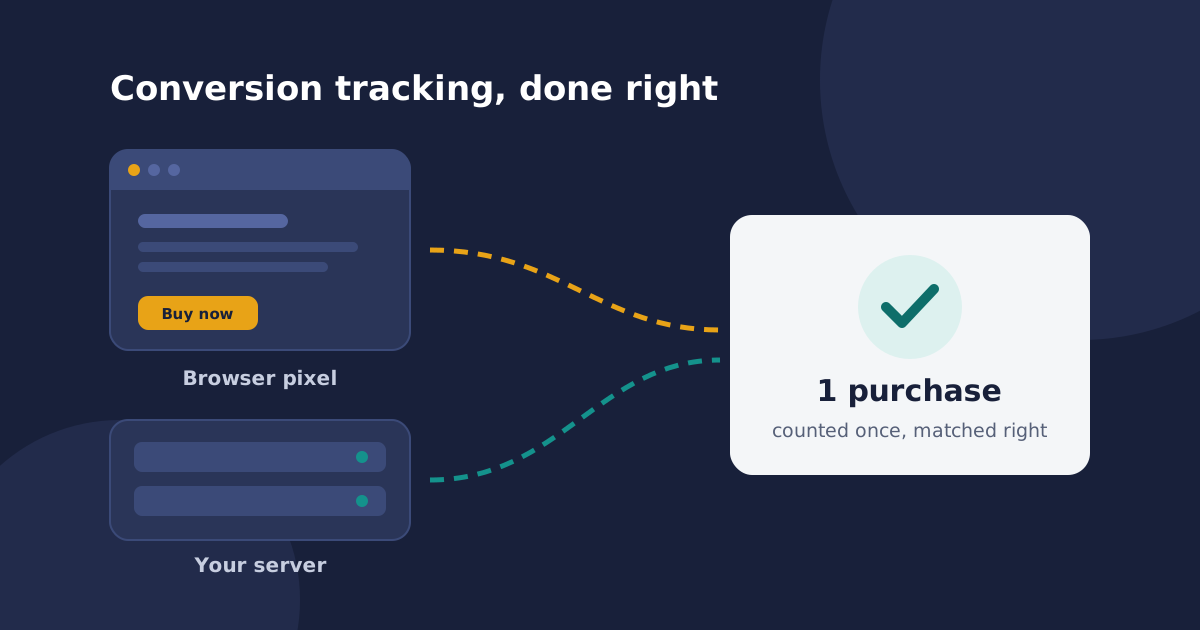
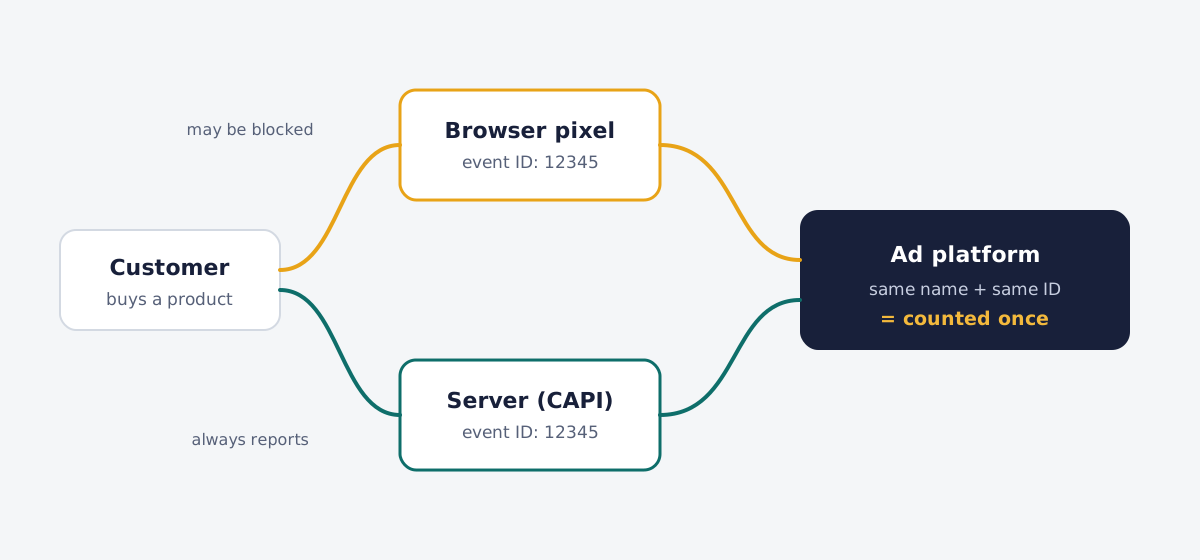
The fix is to send each conversion from two places: the browser and your server or store. Your server knows about every order, and ad blockers can't stop it from reporting. Meta itself recommends running its Conversions API alongside the Meta Pixel.
| Platform | Browser | Server or first-party |
|---|---|---|
| Meta | Meta Pixel | Conversions API |
| Google Ads | Google tag | Enhanced conversions |
| TikTok | TikTok Pixel | Events API |
| Snapchat | Snap Pixel | Conversions API |
Both Meta and Google can receive customer details like email or phone number with each conversion. These are hashed (scrambled into a code) before sending, so the platform can match the conversion to a person without seeing the raw data.
Avoid double counting
Sending the same purchase twice creates a new risk: it may be counted twice. On Meta, the browser and server events must share the same event name (like "Purchase") and the same event ID. Many stores use the order number as the ID. Matching events are then counted once.
Check match quality and consent
Meta rates how well it can match your server events to real people with Event Match Quality, a score from 1 to 10 in Events Manager. Google offers an enhanced conversions diagnostics report. Send more customer details, such as email, phone and city, to improve both.
Only send data with proper consent, explain it in your privacy policy and follow laws like India's Digital Personal Data Protection Act. If you use Google tags, set up Consent Mode with your cookie banner.
7-point checklist before you scale
- Make a test purchase or lead and confirm it appears in each platform.
- Compare one week of orders in your store or CRM with platform numbers. Investigate big gaps.
- Check every funnel step, including payment and thank-you pages.
- Turn on server-side tracking using your platform's official integration.
- Confirm deduplication in Meta Events Manager.
- Review match quality and add missing customer details.
- Send order value and currency (for example INR), and use the same event names in every tool, including GA4, where conversions are now called "key events".
Before and after
| Before the fix | After the fix | |
|---|---|---|
| Monthly Meta spend | ₹50,000 | ₹50,000 |
| Purchases Meta could see | 70 | About 115 |
| Reported cost per purchase | ₹714 | About ₹435 |
| Decision | Cut the budget | Scale with confidence |
The ads didn't change. The data did. These numbers are an illustration, but the pattern is very common.
Final thoughts
Scaling without reliable tracking is like driving faster with a foggy windscreen. Make sure every conversion is counted once, matched well and sent with its value, and every other decision gets easier.
Not sure your tracking is set up right?
Send me a message with what you're running and where the numbers don't add up. Or subscribe to get the next guide in your inbox.
Sources
- Meta for Developers: Handling duplicate Pixel and Conversions API events
- Meta for Developers: Optimal technical setup guide (Event Match Quality)
- Google Ads Help: About enhanced conversions
- Google Ads Help: Enhanced conversions diagnostics report
- Google Ads Help: About consent mode
- Google Analytics Help: Events and key events
Liked this guide?
Subscribe and get an email whenever a new article is published. No spam, just practical marketing knowledge.